Start Remote Support
Step 1: Enter the 5 digit invitation code I give you.
Step 2: Click the blue arrow to connect. (After you enter the 5th number the blue arrow will highlight)
Step 2: Click the blue arrow to connect. (After you enter the 5th number the blue arrow will highlight)
Step 3 (Important)
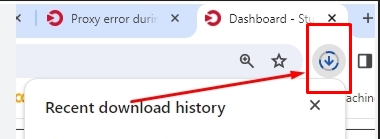
After clicking the blue arrow, look to the top right of your browser.
Click the download arrow, then click Run or Open.
This is normal and required for security.
Click the download arrow, then click Run or Open.
This is normal and required for security.